Posts

Showing posts with the label Tips and tricks

Magento: Do some action after magento form validation

In Magento, we are having default validation function called VarienForm , if we pass our form id it will validate the input fields based on the class we specified into it. Ex. required-entry, validate-email . If we want to do some action before submitting form, follow below code to catch the success action. var dataForm = new VarienForm('reach-form-validate'); $('reach_us_submit').observe('click', function(){ if(dataForm.validator.validate()){ jQuery('#reach_us_submit').attr('disabled','disabled'); dataForm.form.submit(); } else { jQuery('#reach_us_submit').removeAttr('disabled'); } }.bind(dataForm));
Migrate Twitter API from Version 1 to 1.1

My twitter feed response is started showing below message when i was tried to access users_timeline using this URL https://api.twitter.com/1/statuses/user_timeline.xml?include_entities=true&include_rts=true&screen_name=karthi0110&count=1 “The Twitter REST API v1 is no longer active. Please migrate to API v1.1. https://dev.twitter.com/docs/api/1.1/overview.” I have tried by replacing version 1 to 1.1 in the request URL https://api.twitter.com/1.1/statuses/user_timeline.xml?include_entities=true&include_rts=true&screen_name=karthi0110&count=1 it shown “Bad Authentication data” error. So after some research i have fixed it in a proper way. If you are getting this error just migrate it to version 1.1 by following below steps. Process is easy Create App -> Get access codes -> Configure -> Start displaying your feed Go to https://dev.twitter.com/apps/new and fill the form fields like Name, Description, Website.. in-order to create your app. Now ag...

Turn off autocomplete in input fields

In some situations like in promotional code field on Cart page or username in Login page we may not want to show autocomplete below input field when we type some thing or double click on input fields. All we need to do is just add the autocomplete='off' attribute in input field. After entering this code, input field will look like this <input name='couponcode' type='text' autocomplete='off' /> That's it we have turnoff autocomplete in input field.

Change default search engine FireFox

Image
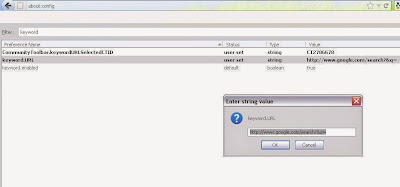
When we type something in firefox URL bar and hit enter means it will show search result in any of the search engines like google, yahoo, ask etc,. If it’s using ask(for example), you can switch to your preferred search engine.  Here’s how to switch default search engine in firefox. 1. In Firefox type about:config in the address bar and press ENTER. 2. Locate and double-click the entry for keyword.URL 3. Set the value based on which search provider you would like to use for your address bar. Here are a few search strings you can use. Yahoo: http://search.yahoo.com/search?p= Ask: http://www.ask.com/web?q= Bing: http://www.bing.com/search?ie=UTF-8&oe=UTF-8&sourceid=navclient&gfns=1&q= Google: http://www.google.com/search?&q= In this way you can change default search engine in FireFox browser

Set your footer sticky at the bottom of the page

It time to show your footer bar sticky at the bottom of the page, just go though the script [code lang="js"] $(window).bind("load", function() { var footerHeight = 0, footerTop = 0, $footer = $("footer");//Added your footer id over here positionFooter(); function positionFooter() { footerHeight = $footer.height(); footerTop = ($(window).scrollTop()+$(window).height()-footerHeight)+"px"; if ( ($(document.body).height()+footerHeight) &lt; $(window).height()) { $footer.css({ position: "absolute" }).animate({ top: footerTop }) } else { $footer.css({ position: "static" }) } } $(window) .scroll(positionFooter) ...