Posts

Magento: Do some action after magento form validation

In Magento, we are having default validation function called VarienForm , if we pass our form id it will validate the input fields based on the class we specified into it. Ex. required-entry, validate-email . If we want to do some action before submitting form, follow below code to catch the success action. var dataForm = new VarienForm('reach-form-validate'); $('reach_us_submit').observe('click', function(){ if(dataForm.validator.validate()){ jQuery('#reach_us_submit').attr('disabled','disabled'); dataForm.form.submit(); } else { jQuery('#reach_us_submit').removeAttr('disabled'); } }.bind(dataForm));
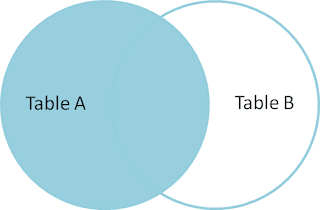
Condition based MySQL left join with CASE

Image
Happy to write post after long time :) I had a scenario that there is are some fields in a table like `id`,`group`,`object_id`. `group` field(ENUM) has three groups named `user`, `deal`, `scene` and `object_id`(it will have the primary key for corresponding group). ie., If the row has group name of `user`, then `object_id` refers to `user_id` and if the row has group name of `deal`, then object id will refers to `deal_id`. What i want to achieve is i need to have a field called `name` in result so that if the current row group is user then username should be displayed in `name` field and if the row group is `deal` then the `name` field should have `deal_name`.

Get current page handler list magento

$this->getLayout()->getUpdate()->getHandles();

jQuery auto-focus on particular text field after page load

Below code will help us to focus on particular text field in page. It will be used for users to start typing their queries after page is loaded. We can use this in login, search pages etc., for quick access. jQuery(document).ready(function() { var txtField = jQuery("#autocomplete").get(0); var elemLen = txtField.value.length; txtField.selectionStart = elemLen; txtField.selectionEnd = elemLen; txtField.focus(); });

Avoid merging old cart items in customer session magento

In this post we will see how to avoid merging old cart items to the current checkout session. Scenario: It will be happen when we login to store and adds some products into cart and leaves store without purchasing. Then coming back to the store after sometime and adds some product into cart without login and proceeds to checkout. In checkout page we will be requested to login, after login we can see some additional products are added into the cart which we are added in previous session. In this case what we have to do is we need to clear old cart items( It was requested by one of my client ) and allow customers to show with the current session items.

Upload SWF file in wordpress

Here is the code to Upload swf file in wordpress. function swf_upload($mimes) { if (function_exists('current_user_can')){ $unfiltered = $user ? user_can($user, 'unfiltered_html') : current_user_can('unfiltered_html'); } if (!empty($unfiltered)) { $mimes['swf'] = 'application/x-shockwave-flash'; } return $mimes; } add_filter('upload_mimes', 'swf_upload'); We can use Kimili Flash plugin to embed the flash file.

Magento file validation - prototype

Add file extension validation in magento form by using below code. Validation.add('validate-jpg-png','Please upload only jpg/png file format!',function(the_field_value){ //console.log(the_field_value); if(the_field_value == '') return true; var extension = the_field_value.replace(/^.*\./, ''); if (extension == the_field_value) { extension = ''; } else { extension = extension.toLowerCase(); } switch (extension) { case 'jpg': return true; case 'png': return true; //you can add more case for valid extension. default: return false; } }); To make it work add validate-jpg-png class to input file type.

Get latitude and longitude using google map api - PHP

Google provides an API to get latitude and longitude based on the valid address. All we need to do is just pass address to that api. We can able to get response in various format. In below code i’m requesting api to return response a json format. If curl is enabled in your server you can use below function to get latitude and longitude by passing just address. function getLocation($address = null){ $url = 'http://maps.googleapis.com/maps/api/geocode/json?address='.rawurlencode($address).'&sensor=false'; $ch = curl_init(); curl_setopt($ch, CURLOPT_SSL_VERIFYPEER, false); curl_setopt($ch, CURLOPT_RETURNTRANSFER, true); curl_setopt($ch, CURLOPT_URL,$url); $result=curl_exec($ch); $res = json_decode($result, true); if(isset($res['results'][0]['geometry']['location'])){ return $res['results'][0]['geometry']['location']; }else{ ...

Fixed - Quantity defaults to 0 in product view page magento

We might come across the problem, when we go to product view page in magento qty box will show 0 qty as default. We can change the default value by following below steps. Steps to change default qty in product view page 1. Goto Admin page -> System -> Configuration -> Inventory -> Product Stock Options. 2. Click Add Minimum Qty button. 3. Now add your minimum Qty (ex: 1) that you want to display in product view page in text box then click ‘Save config’. That’s it, now 0 qty in product view page will be replaced by the number that you have mentioned in Minimum Qty text box.

Migrate Twitter API from Version 1 to 1.1

My twitter feed response is started showing below message when i was tried to access users_timeline using this URL https://api.twitter.com/1/statuses/user_timeline.xml?include_entities=true&include_rts=true&screen_name=karthi0110&count=1 “The Twitter REST API v1 is no longer active. Please migrate to API v1.1. https://dev.twitter.com/docs/api/1.1/overview.” I have tried by replacing version 1 to 1.1 in the request URL https://api.twitter.com/1.1/statuses/user_timeline.xml?include_entities=true&include_rts=true&screen_name=karthi0110&count=1 it shown “Bad Authentication data” error. So after some research i have fixed it in a proper way. If you are getting this error just migrate it to version 1.1 by following below steps. Process is easy Create App -> Get access codes -> Configure -> Start displaying your feed Go to https://dev.twitter.com/apps/new and fill the form fields like Name, Description, Website.. in-order to create your app. Now ag...

WePay Crowdfunding Payment integration in cakephp

How to implement WePay payment in CakePHP? Here is an idea that how to implement the WePay in cakePHP less than 10 mins! Follow the given steps to implement WePay on your cakePHP app.

Adding cusom options automatically to magento products

Hello friends in this post i'm going to give you a nice code to add custom options to your product when it is saved. After searching long time got good resources with that i have created an event to add custom options. Magento having lot of feature to customize the product

Convert long url to short url using tinyurl api

Tinyurl provides us a short and simple service to convert long URL to small(tiny) URL. We can send email without link breakage. Here is the tinyurl api to get shorten url. You can use any of the method. Method 1: Use file_get_contents to fetch tinyurl. echo file_get_contents('http://tinyurl.com/api-create.php?url=http://www.websnippetz.com'); file_get_contents is not working? If your are able to access php.ini file set allow_url_fopen = On or you can use the below method. Method 2: Use cURL (runs faster than file_get_contents) to fetch tinyurl. function get_tiny_url($url) { $url = "http://tinyurl.com/api-create.php?url={$url}"; $ch = curl_init(); $timeout = 5; curl_setopt($ch,CURLOPT_URL,$url); curl_setopt($ch,CURLOPT_RETURNTRANSFER,1); curl_setopt($ch,CURLOPT_CONNECTTIMEOUT,$timeout); $data = curl_exec($ch); curl_close($ch); return $data; } echo get_tiny_url('http://www.websnippetz.com');

Modify item price in cart after placing order using sales_quote_add_item

We can easily modify product price after placing order in magento using the event sales_quote_add_item . We can see this hook registered in app/code/core/Mage/Sales/Model/Quote.php line:874. This is the event created by magento. Mage::dispatchEvent('sales_quote_add_item', array('quote_item' => $item)); We can access $item values using its registered event name sales_quote_add_item and we can modify the price with our logic.

Send email from xampp localhost

Send email from xampp localhost. Follow the easy steps Goto http://glob.com.au/sendmail/ , download latest sendmail package. Extract the zip file and copy the files into your \xampp\sendmail folder(Replace every file in the existing folder). Update the sendmail.ini file in sendmail folder with the following details, and make sure it is not commented(;). smtp_server=smtp.gmail.com smtp_port=25 error_logfile=error.log debug_logfile=debug.log auth_username=yourname@gmail.com auth_password=gmailpassword force_sender=yourname@gmail.com Here i have added gmail account for sending emails. Open xampp\php\php.ini file find sendmail_path and update its value to "\"C:\xampp\sendmail\sendmail.exe\" -t" . Now it will look like below sendmail_path = "\"C:\xampp\sendmail\sendmail.exe\" -t" Make sure it's not commented(;) Restart your apache server. Now you can send email from xampp localhost! enjoy :-)

Unzip file in server using PHP ZipArchive

Once i wanted to upload WordPress folder which contains 1000's of files, if i choose to upload those files using FTP it will take much time.

Override magento controller

Modifying magento core file is not at all good idea. All core files that we have modified will be smashed while magento upgrade. Magento have a feature to keep our custom code in local(app/code/local) folder. Inside that folder we can keep our custom codes safely.

Delete single order in magento using SQL query

Here is the query to delete single order in magento. All we need to do is just replace 'xxxxxxxxx' with your order_id and run it in phpMyAdmin. It works fine in Magento 1.4.x and 1.7.x version. SET @orderId = 'XXXXXXXXX'; #replace this WITH your ORDER NUMBER SET FOREIGN_KEY_CHECKS = 1; DELETE FROM sales_flat_order WHERE increment_id = @orderId; DELETE FROM sales_flat_quote WHERE reserved_order_id = @orderId;

Turn off autocomplete in input fields

In some situations like in promotional code field on Cart page or username in Login page we may not want to show autocomplete below input field when we type some thing or double click on input fields. All we need to do is just add the autocomplete='off' attribute in input field. After entering this code, input field will look like this <input name='couponcode' type='text' autocomplete='off' /> That's it we have turnoff autocomplete in input field.

Add tinyMCE editor in magento custom module

If we have created a custom module using Magento Module creator means, it will not contain 'wysiwyg(tinyMCE)' editor feature. We can add the 'wysiwyg' editor in custom module within 2 steps.